
















BATTERY POWER FOR HIVE LEDS:
All of Hive’s Omni-Color LEDs offer options to be run off of a battery. However each fixture has certain, power and voltage requirements that must be met by the battery selected. When considering what battery will work with your Hive light it is important to identify the voltage and wattage of your battery to ensure it can provide enough power for your Omni-Color LED. Depending on the voltage and power requirements certain batteries may not work, others may require additional accessories like and external voltage regulator or dual battery plate system. Below is a guide that will hopefully answer any questions you may have about running Hive Lights on battery.
C-SERIES OMNI-COLOR LEDS:
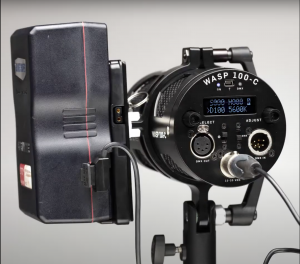
All C-Series lights are Direct Current Voltage electronics which makes them easy to run directly off batteries. They all have 4 – pin XLR sockets wired with pin 1 ( – )DCV In and pin 4 (+) DCV in, which is standard pin wiring on most cinema cameras.
Bee 50-C: The Bee 50-C is a 12VDC fixture with an acceptable voltage range of 12-18VDC input. We recommend 12VDC, 14.4VDC, 14.8VDC batteries with 60Wh or higher output. Hive offers a single V-Mount or Gold-Mount Bracket which can accept the above battery voltages. This battery plate can be mounted to the yoke itself or to a pole, stand or rigged to a grid and connects power to the light using a D-Tap or P-Tap to 4 pin XLR cable.
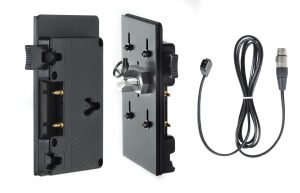
- C-GMBP: https://hivelighting.
com/products/gold-mount- battery-plate-d-tap-connector- cable/ - C-VMBP: https://hivelighting.
com/products/v-mount-battery- plate-d-tap-connector-cable/ - C-GMBPM: https://hivelighting.com/
products/gold-mount-battery- mafer/ - C-VMBPM: https://hivelighting.
com/products/v-mount-battery- mafer/ - C-DT4PXLR : https://hivelighting.com/
products/d-tap-4-pin-xlr- connector-cable/
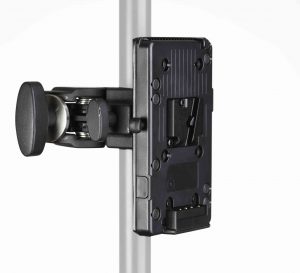
Wasp 100-C: The Wasp 100-C is a 19VDC fixture with an acceptable voltage range of 12-20V DC input. We recommend 14.4VDC batteries with 90Wh or higher output. Hive offers a single V-Mount or Gold-Mount Bracket which can accept the above battery voltages. This battery plate can be mounted to the yoke itself or to a pole, stand or rigged to a grid and connects power to the light using a D-Tap or P-Tap to 4 pin XLR cable.
- C-GMBP: https://hivelighting.
com/products/gold-mount- battery-plate-d-tap-connector- cable/ - C-VMBP: https://hivelighting.
com/products/v-mount-battery- plate-d-tap-connector-cable/ - C-GMBPM: https://hivelighting.com/
products/gold-mount-battery- mafer/ - C-VMBPM: https://hivelighting.
com/products/v-mount-battery- mafer/ - C-DT4PXLR : https://hivelighting.com/
products/d-tap-4-pin-xlr- connector-cable/
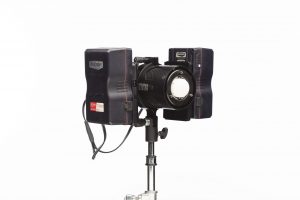
Hornet 200-C: A single V-Mount or Gold-Mount Bracket can work for the Hornet 200-C, but you need to use 26V or 28V Batteries. These are available from a variety of battery manufacturers. 14.4V Batteries can also be used with the Hornet 200-C, but you will need additional accessories to increase the voltage required. There are two options, one is to use the Hornet 200-C Voltage Regulator this allows the 200-C to be run on a single 14.4V battery as long as the battery has more than 150Wh of power. The second option allows two 14.4V batteries in series so they reach 28.8V. This can be done with 2X of our V-Mounts or Gold-Mounts and a custom Hive Dual Battery Y-Cable.
Mounting Plate and Battery Cable SKUS From Hive for Hornet 200-C:
- HLS2C-DBPK-VM: https://hivelighting.com/
products/hornet-200-c-dual-v- mount-battery-plate-kit-w-y- cable/ - HLS2C-DBPK-GM: https://
hivelighting.com/products/ hornet-200-c-dual-gold-mount- battery-plate-kit-w-y-cable/ - HLS2C-BYCB: https://hivelighting.com/
products/hornet-200-c-dual- battery-y-cable/ - HLS2C-BCVR: https://hivelighting.com/products/hornet-200-c-battery-cable-w-in-line-voltage-regulator/
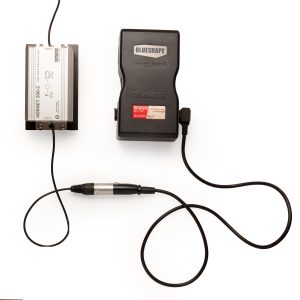
- Anton Bauer : 1 x https://www.antonbauer.com/en/antonbauer/dionic-26v-240wh-gold-mount-plus-battery/c-27/p-1847
- Anton Bauer: 1 x https://www.antonbauer.com/en/antonbauer/cine-vclx-battery/c-27/p-1862
- FX Lion: 1 x https://www.fxlion.net/
product-detail/98wh-v-mount- battery-nano-two/ - Hawk Woods: 1 x https://www.hawkwoods.co.uk/Cine/P/RP-150H
- IndiProTools: 1 x https://indiprotools.com/
collections/new-arrivals/ products/vm26vkt - NanLite: 1 x http://en.nanlite.com/
machine/detail-171 - Shape: 1 x https://www.shapewlb.com/shape-full-play-26-v-260-wh-rechargeable-lithium-ion-v-mount-battery-for-light-and-cine-camera/
- SWIT: 1 x https://www.switusa.com/product-page/pb-h290s-290wh-intelligent-bi-voltage-battery-pack
- Westcott: 1 x https://www.fjwestcott.com/26v-lithium-ion-battery-150wh
Hive sells both V-mount and Gold Mount battery plate kits. The Dual Battery Y-Cable is also available separately.
CX OMNI-COLOR LEDS:
All CX lights from Hive are also Direct Current Voltage electronics but require an external voltage regulator to operate on battery.
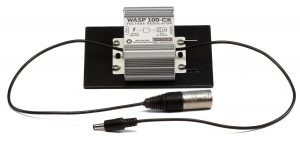
Wasp 100-CX:
The Wasp 100-CX is a 24VDC but with the Wasp 100-CX Voltage Regulator the light is compatible with any 10-20VDC, 75Wh or greater battery with adapter to 4pin XLR. Hive offers a single V-Mount or Gold-Mount Bracket which can accept the above battery voltages. This battery plate can be mounted to the yoke itself or to a pole, stand or rigged to a grid and connects power to the voltage regulator using a D-Tap or P-Tap to 4 pin XLR cable.
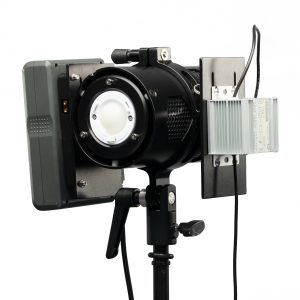
- WLS1CX-BCVR: https://hivelighting.com/products/wasp-100-cx-battery-cable-w-in-line-voltage-regulator/
- C-GMBP: https://hivelighting.
com/products/gold-mount- battery-plate-d-tap-connector- cable/ - C-VMBP: https://hivelighting.
com/products/v-mount-battery- plate-d-tap-connector-cable/ - C-GMBPM: https://hivelighting.com/
products/gold-mount-battery- mafer/ - C-VMBPM: https://hivelighting.
com/products/v-mount-battery- mafer/ - C-DT4PXLR : https://hivelighting.com/
products/d-tap-4-pin-xlr- connector-cable/
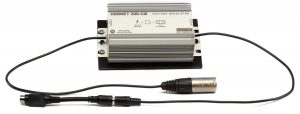
Hornet 200-CX:
The Hornet 200-CX is a 24VDC but with the Hornet 200-CX Voltage Regulator the light is compatible with any 10-20VDC, 150Wh or greater battery with adapter to 4pin XLR. Hive offers a single V-Mount or Gold-Mount Bracket which can accept the above battery voltages. This battery plate can be mounted to the yoke itself or to a pole, stand or rigged to a grid and connects power to the voltage regulator using a D-Tap or P-Tap to 4 pin XLR cable.
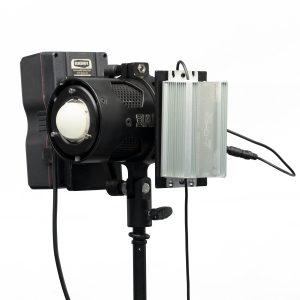
Mounting Plate and Battery Cable SKUS From Hive for Hornet 200-CX when paired with Voltage Regulator:
- HLS2CX-BCVR: https://hivelighting.com/products/hornet-200-cx-battery-cable-w-in-line-voltage-regulator/
- C-GMBP: https://hivelighting.
com/products/gold-mount- battery-plate-d-tap-connector- cable/ - C-VMBP: https://hivelighting.
com/products/v-mount-battery- plate-d-tap-connector-cable/ - C-GMBPM: https://hivelighting.com/
products/gold-mount-battery- mafer/ - C-VMBPM: https://hivelighting.
com/products/v-mount-battery- mafer/ - C-DT4PXLR : https://hivelighting.com/
products/d-tap-4-pin-xlr- connector-cable/